


Your phone buzzes. A friend writes on WhatsApp: “Please help me, I need 50,000 on Mobile Money, I’ll pay back tonight.” You send it, then find out your friend never wrote that message. Their account was hijacked.
This happens in Uganda every day. Our social media accounts hold our contacts, photos, businesses and sometimes our money, so they are valuable to criminals. Most hackers don’t use movie-style “hacking.” They trick people. Here are the most common ways it happens and how to protect yourself.
1. The “I sent you my code by mistake” trick
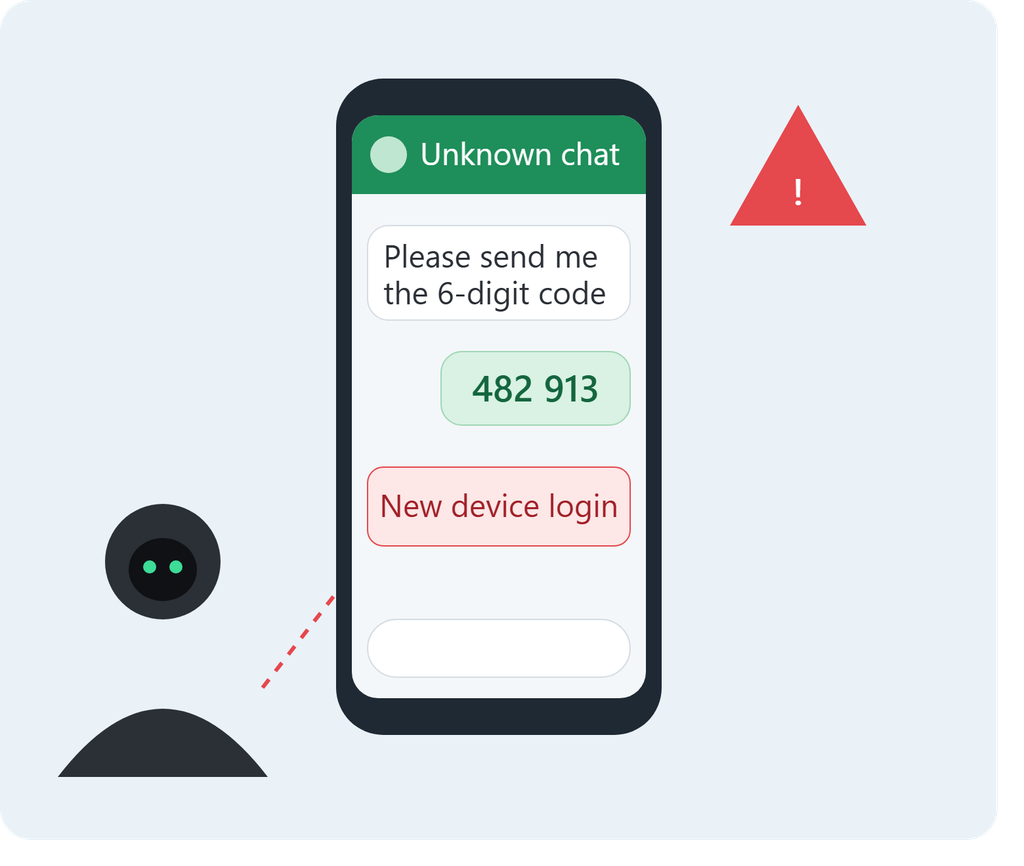
This is one of the most common WhatsApp scams. You get a message from a contact, often someone you know whose account is already hijacked, saying: “Hi, I accidentally sent my verification code to your number. Please send it back.”
In reality, the attacker is trying to log in to your WhatsApp on their own phone. WhatsApp sends a 6-digit code to your number, and if you hand it over, the attacker is in. Within minutes they are messaging your contacts, asking for money in your name.
Rule: Never share a verification code with anyone, including people you trust. The code is the key to your account.
2. Phishing: fake pages that look real
You get a link by SMS, WhatsApp or inbox saying:
- “Your Facebook page will be deleted in 24 hours. Verify here.”
- “You’ve won a scholarship / job / MTN or Airtel promotion. Log in to claim.”
- “Someone posted a video of you. Click to watch.”
The link opens a page that looks exactly like Facebook, Instagram or TikTok. When you type your username and password, you give them directly to the criminal. Many people are caught because the message creates panic or excitement, and they act before thinking.
Tip: Look at the web address. A real login page is on the official domain, not something like “facebook-verify-help.com.” When in doubt, don’t click. Open the app yourself.
3. Weak and reused passwords
Many people use passwords like their name plus a birth year, “123456,” or a phone number. Many also use the same password everywhere: email, Facebook, Instagram, even banking apps.
When one website is breached, criminals take the leaked email-and-password pairs and try them on other platforms. If you reuse a password, one leak can open all your accounts.
4. SIM swap and phone number takeover
In Uganda, your phone number is tied to nearly everything: WhatsApp, Mobile Money, and password recovery for other accounts. If a criminal convinces a telecom agent, or tricks you, into moving your number to a new SIM, they receive your verification codes and can take over your accounts.
Warning signs include your phone suddenly losing network for no reason, or “SIM changed” notifications. If your signal disappears unexpectedly, contact your network provider immediately.
5. Fake apps and “who viewed my profile” tools
Apps and websites promise to show who viewed your profile, give you free followers, or unlock “premium” features. To use them, you log in with your social media account, and that hands over access. Some also install harmful software on your phone.
No genuine app can show you who viewed your profile on most platforms. If it sounds too good to be true, it is.
6. Social engineering and impersonation
Sometimes there is no hacking at all. A scammer copies your photos, creates a duplicate profile and messages your friends: “I changed my number” or “I’m stuck, please send money.” Others call pretending to be from “Facebook support,” “the telecom company” or “the bank,” and talk you into revealing information.
Real companies do not ask for your password or codes over the phone.
7. Public Wi-Fi and shared devices
Logging in at an internet café, on a borrowed phone, or on unsecured public Wi-Fi can expose your details. If you forget to log out, the next person can open your account.
Why this matters
A hijacked account is more than embarrassing. Attackers use it to scam your family, friends and customers, spread false information, blackmail you with private photos, or lock you out of your business page. For small businesses that sell on Facebook, Instagram or WhatsApp, losing the account can mean losing income.
How to protect yourself
- Turn on two-step verification on WhatsApp, Facebook, Instagram, TikTok, Gmail and every other account. On WhatsApp, go to Settings > Account > Two-step verification and set a PIN you never share.
- Use a strong, unique password for each account. A long passphrase of several random words is better than a short complicated one. A password manager helps.
- Never share codes, PINs or passwords, no matter who asks.
- Check links carefully. Don’t log in through links sent in messages.
- Secure your email. Your email account can reset all your other passwords, so protect it the most.
- Review logged-in devices. In your account settings, check which devices are connected and log out any you don’t recognise.
- Protect your SIM. Keep your NIN-registered SIM safe, don’t let strangers handle your phone or ID, and report network loss quickly.
- Warn your contacts. If you’re hacked, tell people immediately so they don’t send money.
What to do if you’ve been hacked
- Try to log in and reset your password right away.
- On WhatsApp, re-register your number to get back in. This logs out the attacker.
- Use the platform’s “My account was hacked” recovery option.
- Change the password on your email and any account that shared the same password.
- Post a warning on your other channels so friends know not to trust messages from you.
- Report the scam to your telecom provider and, if money was lost, to the police.
Final thoughts
Hackers rely on urgency, fear, greed and trust. If a message pushes you to act fast, share a code or click a link, slow down and verify through another channel, such as calling the person directly. A few minutes of caution can save you your account, your money and your reputation. Share this post with a friend or family member, because the next target could be someone you know.